
I Thought My Apple Calendar Setup Was Perfect. Then I Found This Free Mac App.
One Tiny Menu Bar App Changed How I Stay On Top of My Day.


My Apple Calendar setup has been perfect for years. Or so I thought.
My personal calendars cover all the important areas of my life. My work calendars are integrated too, and Reminders shows up right alongside everything else. Every morning, Apple Calendar is one of the first apps I open — a quick look at what’s ahead for the day and the week.
Without it, very little in my life would work.
I had absolutely no feeling that anything was missing.
Then I came across an app called Today in a YouTube video. The last puzzle piece in my setup, one I didn’t even know was missing.
The Discovery
Which video it was, I honestly can’t remember.
But I remember the moment clearly. Today was introduced as a small menu bar tool for the Mac, minimal and stripped down to the essentials. Exactly the kind of thing I like. No big drama, no flashy marketing, just a few seconds that were enough to see that this app gets a lot of things right. But what does it actually do that’s supposed to be so great?
In one sentence: Today shows you the events of the current day right in your menu bar — and nothing else.
That might not sound spectacular, but you should install it anyway. Because what Today does is far from obvious.
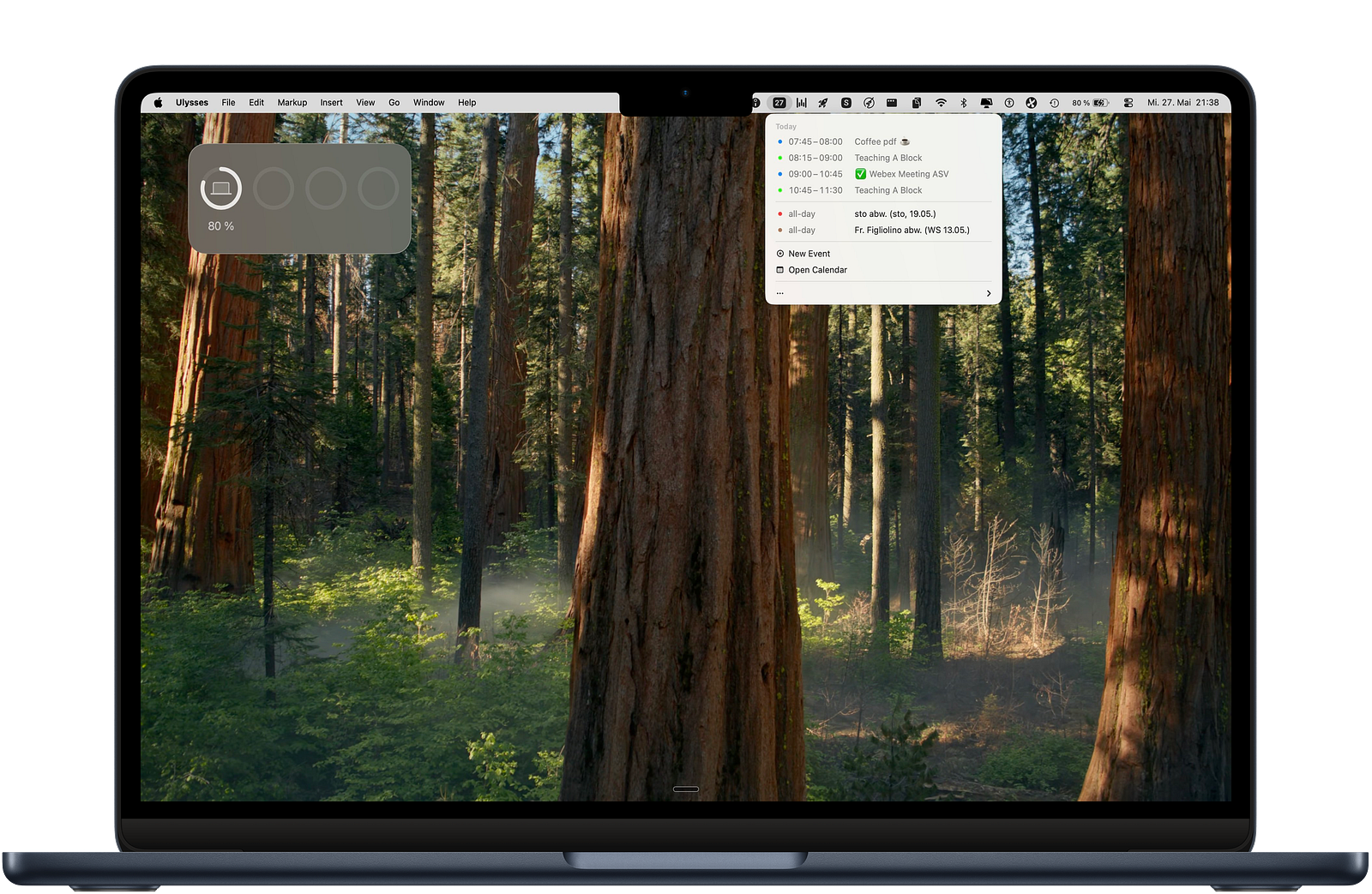
Whenever I wanted to check my schedule, I used to open Apple Calendar. No big deal, but something would almost always happen that I couldn’t seem to avoid.
I wouldn’t just check what was coming up that day. I’d glance at the next day too, probably the whole rest of the week. A little scrolling, a quick look at the details of some event. Two minutes later, I’d lost my focus entirely. Sure, as a teacher I’m not always working on tasks that demand complete concentration — but it still bothers me when something as mundane as my calendar pulls me off track.
Today solves exactly that problem, in the simplest way imaginable.
Because the app lives only in the menu bar, there’s no opportunity to get distracted in the first place. One click, and I see my events for the day. Nothing more, nothing less. What convinced me even further is that Today works dynamically. If I add a new event in Apple Calendar during the day, it appears here immediately.
I used to work with daily notes in Apple Notes, for example.
Using a Shortcut, my calendar events would be added there automatically every morning. Handy, sure — but static. Whatever was entered stayed that way, even if my day changed completely.
Today always shows the current state of things, live and without any effort. The app is also free on the Mac App Store. By the way, I have no connection to the developers, but I recommend it without reservation.
What Else the App Can Do
I’ve been holding back a bit, Today can do a little more than I’ve let on, even if most of it feels like a bonus to me.
The most important thing first: in the settings, you choose which of your calendars are displayed. Whether iCloud, Google, or Outlook — everything you’ve integrated into Apple Calendar is available here. I only show my most relevant calendars, not my wife’s appointments, which are also synced with mine.
That way, the overview stays an actual overview.
The app’s menu window also lets you create a new event or jump straight to Apple Calendar. I rarely use either. I always open apps through Spotlight, and for new events I prefer one of my favorite Shortcuts. But one of those options might be exactly right for you.
But there are two more settings in Today that I find genuinely useful.
First, you can choose to hide past events for the day. I turned that off immediately, it makes the overview even cleaner and keeps the focus squarely on the question: what’s still coming up today?
Second, Today can look a little beyond its own name by showing the first event of the next day. I like that, even if it’s not strictly relevant to what’s happening right now.
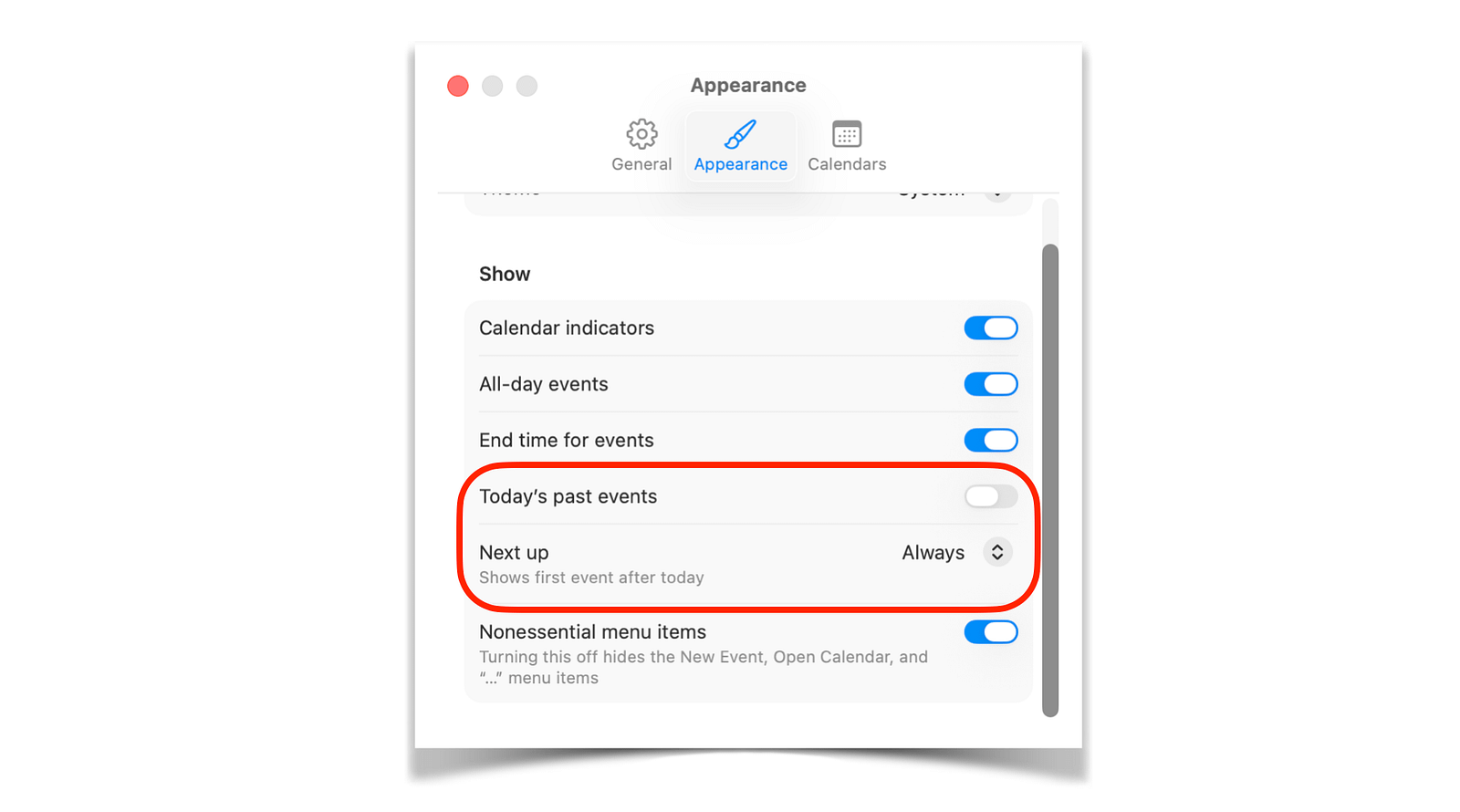
In this screenshot you can see both settings, along with other helpful options like hiding all-day events.
Today Belongs on Every Mac
A while back, I published an article listing the most important apps on my Mac — the ones too good to delete.
Today wasn’t on that list.
Not because it didn’t deserve to be, but because I simply hadn’t discovered it yet. If I were writing that article today, it would be on there without question.
Today doesn’t make Apple Calendar better. It just makes it invisible in your daily workflow, until you actually need it.
If you’re just starting to organize your life with Apple Calendar, I have one more tip for you. Here you’ll find my complete setup guide, so the foundation for a relaxed approach to time management is in place too.
Thanks for reading,
Georg
You might like to try ItsyCal.
Looks like it does not show Reminders. Is this correct?